FileMarker.NET Pro
Version: 2.3
File Size: 12.8 Mb
Price: $34.95
No Spyware or Adware!
or Windows 11,
x32 or x64 editions.
NTFS-formatted hard drive
What's new in FileMarker.NET 2.0
More stable work, rewritten core, PDF, PNG, JPG and other files change, ability to customize files by using your own icons, custom tabs and improved interface.
This update is free for everyone, who bought FileMarker.NET on 16th October 2017 or later. All other users, including giveaway users, have to pay an upgrade fee. Buyers of 1.x version have huge time-limited upgrade discount. Check your email to get it.
So, let's see in detail what is new.
More stable change of file icons and updated program core
We have rewritten the core of the program almost completely. As a result, FileMarke's main function - changing the icons of files, works much more stable and more correct, unlike the previous version of the program. Most of our time has been spent on this, but for you, it simply means that the program works as you would expect from it.
Despite the fact that this is the most unremarkable update - this is the main reason why we strongly recommend to upgrade to the latest version to all our users.
It has become possible to change icons of PDF files
Now FileMarker.NET is good at changing icons of PDF files on the systems, where the Adobe Acrobat Reader is used as a standard programme for viewing such files. This is a feature that many of our users were asking for.
We have reworked the approach of changing file icons that are displayed with a preview in the system
This is actual for PNG, JPG, GIF, AVI, MPG, and many other file types, that are displayed with a preview (thumbnails) of what they store inside. If in version 1.0 you may not notice the change of the icon of these files, then now there is a checkbox "Always show icons and never thumbnails". The customized icon will always be visible if you set it.
FileMarker.NET has learned to change the icons of unregistered file types
We have expanded the icon changing functions of FileMarker.NET. Now the program can change the icons of even those files types that have no corresponding program on your computer to open them. For example, if you received a set of PSD files from your designer, and you don't have Adobe Photoshop installed on your computer, you can still color-mark PSD files.
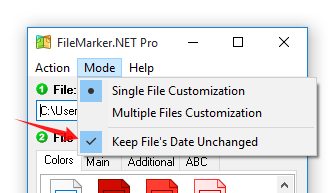
The ability to mark files without changing the date of file change was added to the Pro version
Thanks to the new "Keep File's Date Unchanged" setting, FileMarker.NET Pro users can choose whether the date of the last file change will be changed while marking. This means that if you sort your files by change date, you can choose whether the marking of files influences on the order of the files.
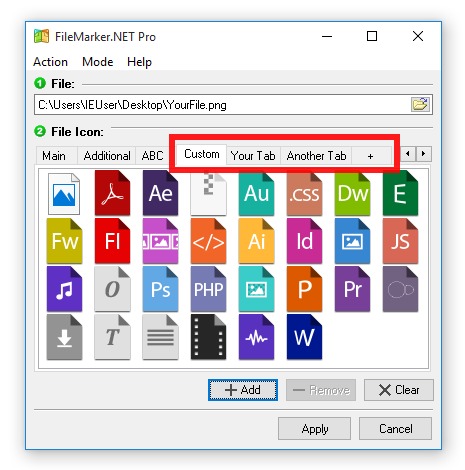
We have added the ability to mark files with your own icons and conveniently sort them
In version 2.0, we've added the ability to add an infinite number of Custom Tabs with Custom Icons. This means that now you can mark files with your own icons downloaded from the Internet.
We also made it convenient for you to add them and keep them in order. To do this, you have the ability to add multiple icons to custom tabs at one time. And we've added the ability to have an unlimited number of your own Tabs with custom names. This works in Pro version only.
FileMarker.NET interface has become multilingual
Now you can translate the FileMarker.NET interface into any language. At the moment, a translation into Russian has been added, but with the release of new versions, we will add new translations. We are currently looking for someone to help us translate FileMarker.NET into your native language in exchange for a free Pro license. Here you can read more.
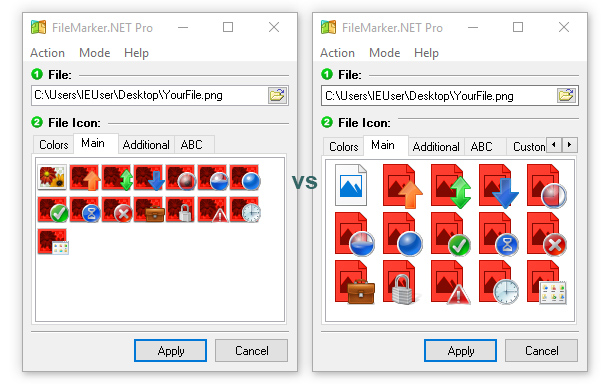
Large icons in the main program window
The interface of the main window was improved. The default size of the icons is 48x48 now. That makes you easier to see what is shown in the icon and is especially convenient for the people, who work with big monitors.
More than 30 other minor improvements and bug fixes have been made to improve the user experience
There are other, but smaller changes and bug fixes. If you are interested in a more detailed list of corrected errors and changes in the new version, you can see it in the ReadMe.rtf file in the directory with the program.